EID-EXP-004 – Identity Protection Alerts Admins Ignore – Default Alerts Without Enforcement
Experiment ID: EID-EXP-003
Category: Identity Protection / Alert Handling
Title: Identity Protection Alerts Admins Ignore – Default Alerts Without Enforcement
Result: Default identity risk alerts do not block access and are often ignored by admins
Risk Rating: High
Evidence Scope
This experiment examines how Microsoft Entra ID Identity Protection risk alerts, such as risky sign-in and risky user, are generated but do not block access by default. It also considers how administrators may overlook these alerts without remediation or Conditional Access enforcement.
Identity Protection alerts identify suspicious activity, such as sign-ins from unknown locations or leaked credentials. However, without automated remediation, attackers may continue to access resources.
Tenant Conditions:
- Microsoft Entra ID tenant with P2 licensing
- One standard test user
- Default Identity Protection alerts enabled
- No risk-based Conditional Access policies enforced.
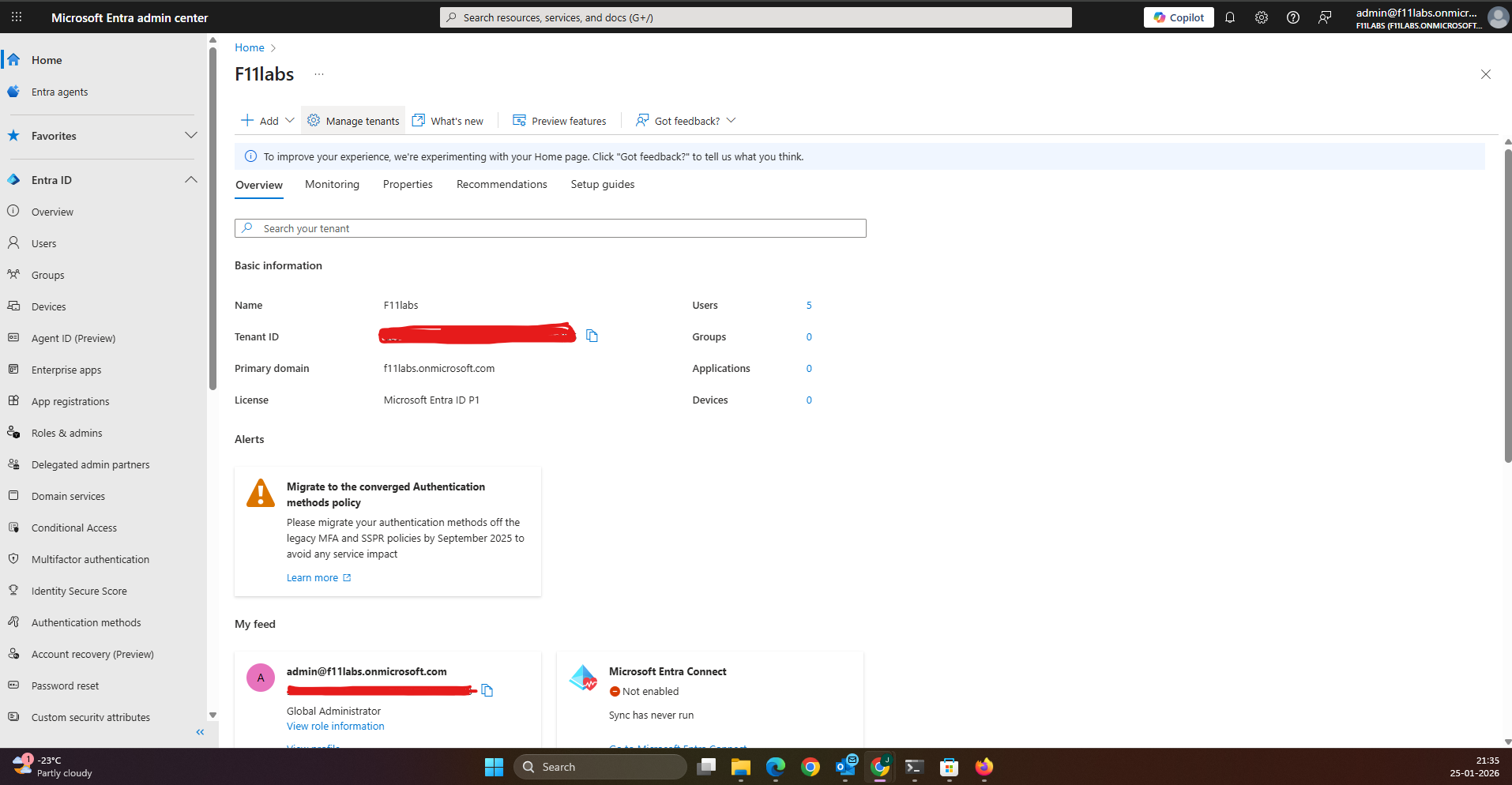
Tenant Validation 004-01
All evidence in this experiment was collected from the Microsoft Entra ID tenant**F11labs** with primary domain **f11labs.onmicrosoft.com**.
Evidence Artifact:
EID-EXP-001-Tenant-Overview.png
EID-EXP-004-02 – Risky Sign-In Alert Does Not Block Access
Control Area: Identity Protection – Risk Detection
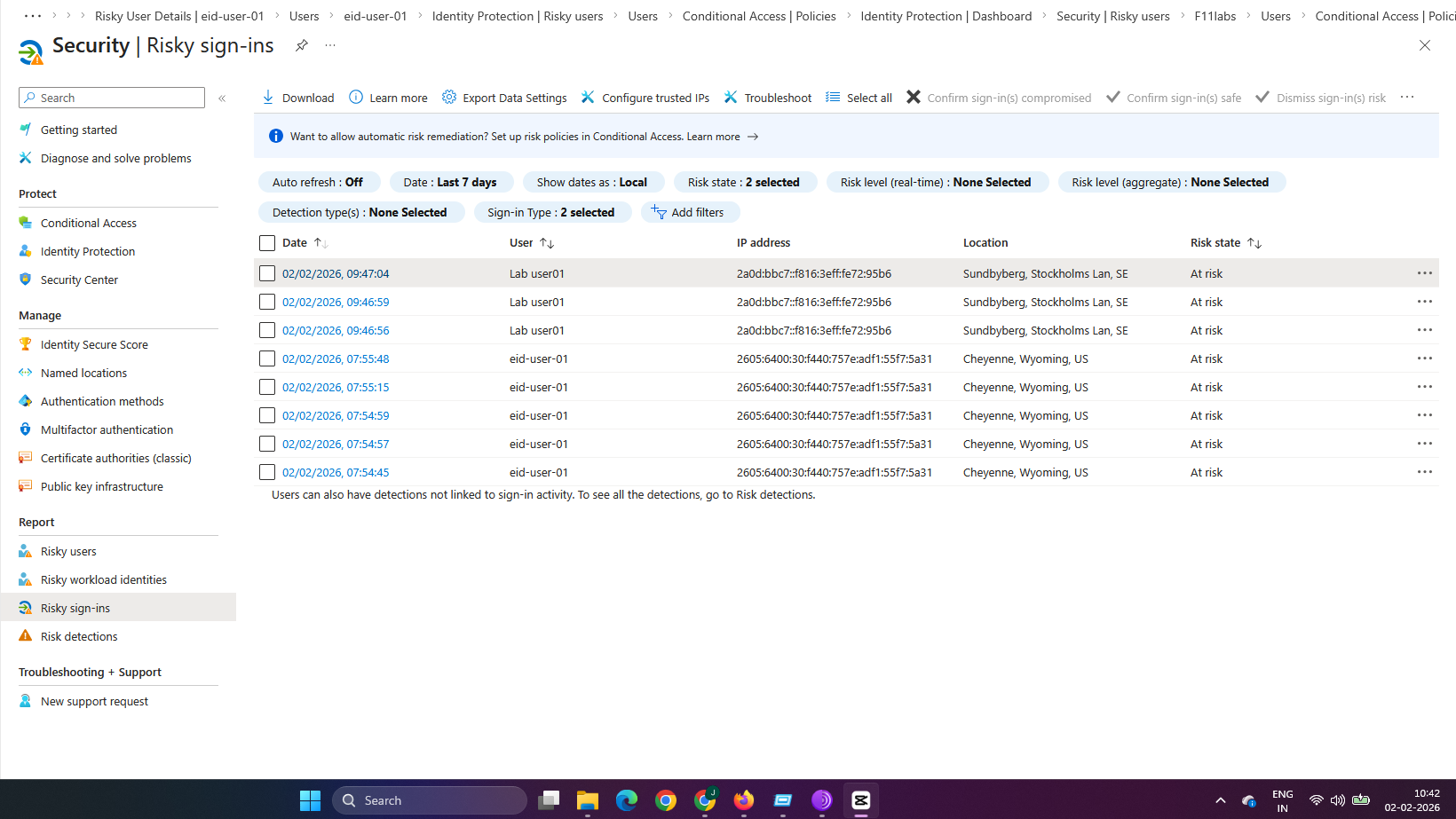
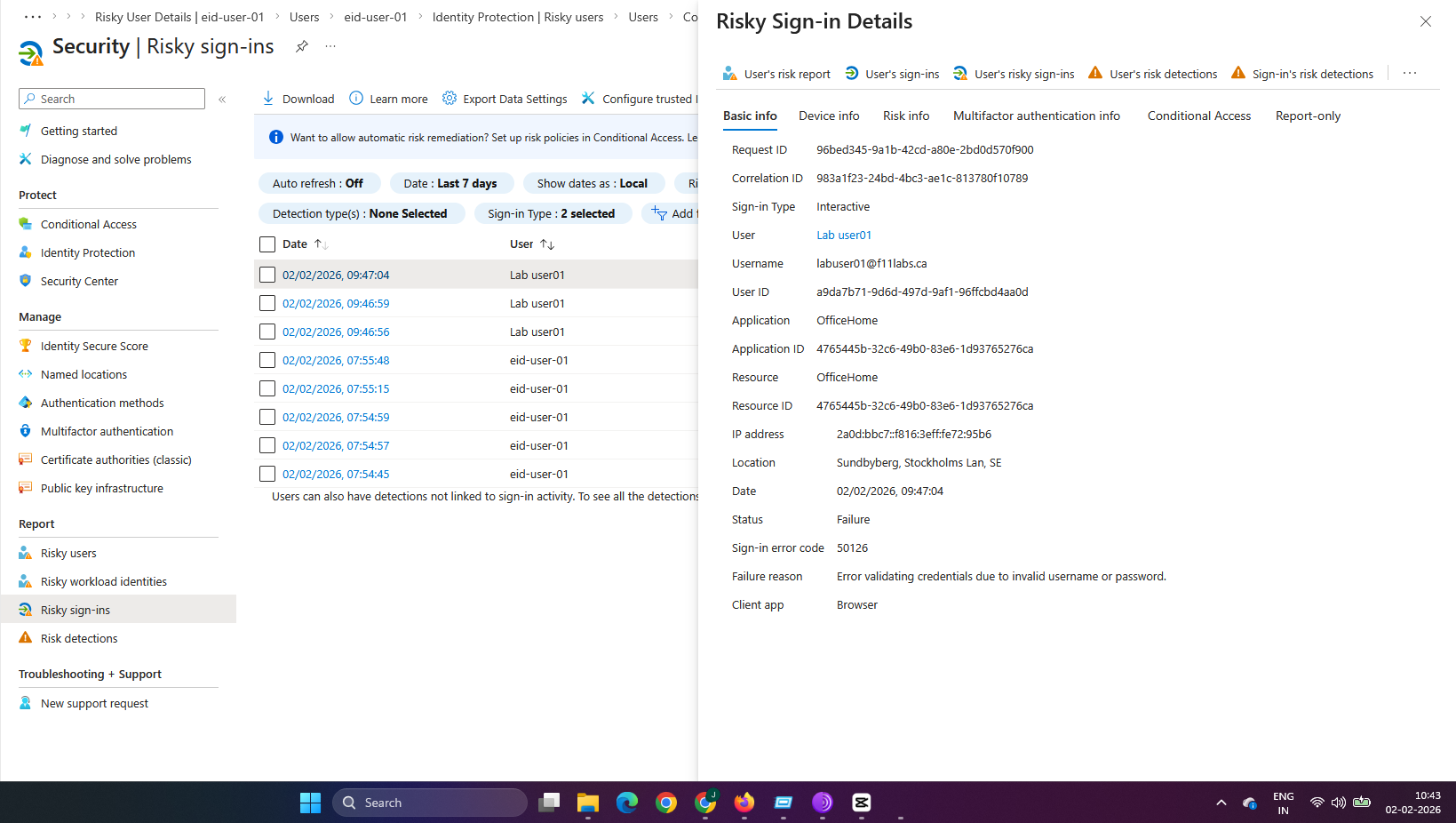
Observation: A user signs in from an unfamiliar or risky location, such as a VPN, which triggers a risky sign-in alert.
Expected Secure State: Suspicious sign-ins should trigger alerts and either block access or require remediation.
Actual Result:
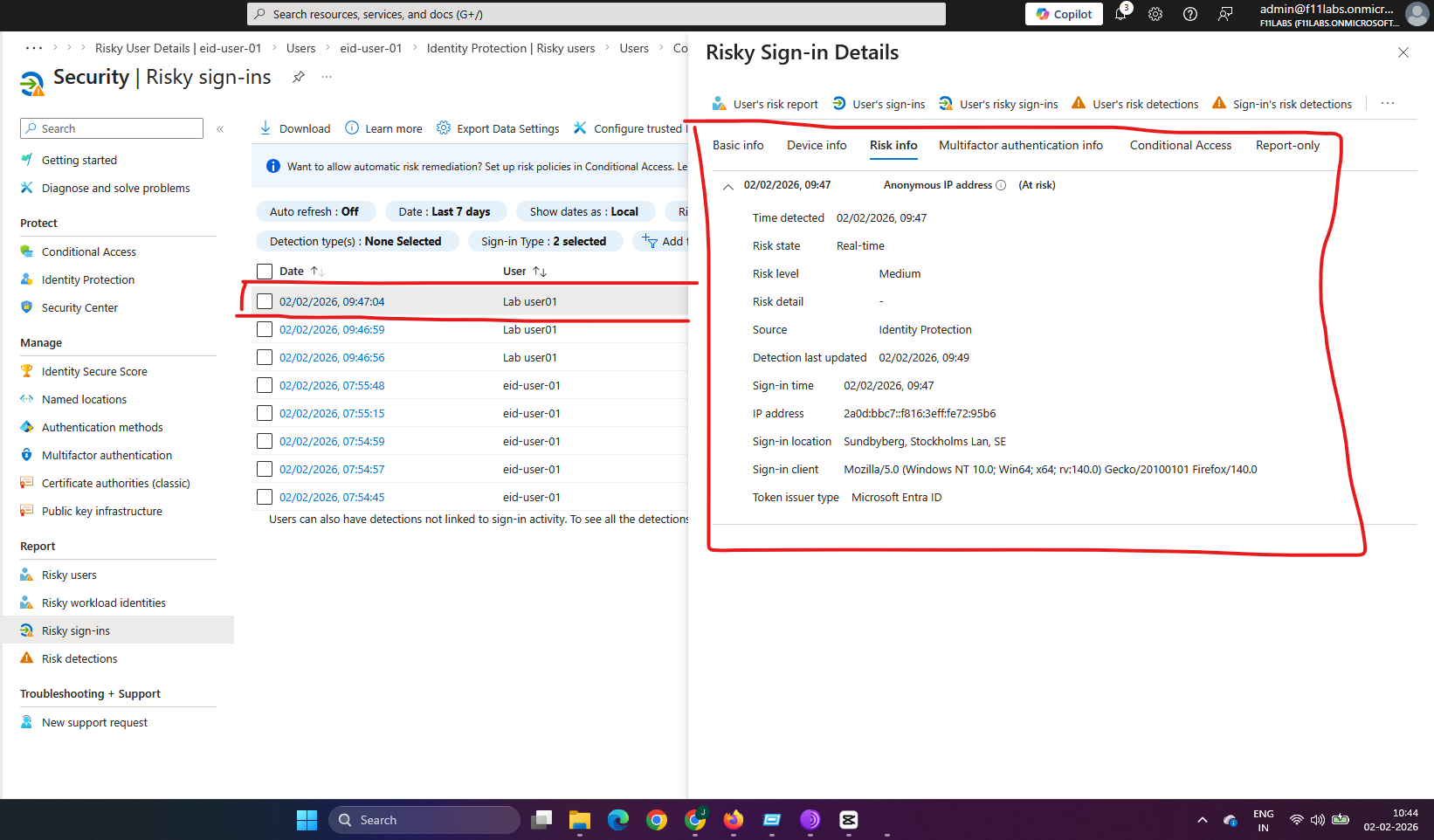
- Identity Protection logs the risky sign-in alert.
- The user is granted access after completing MFA.
- No remediation or session block is enforced without additional policies.
Impact:
- Suspicious activity is logged, but does not prevent access.
- Administrators may see the alert in logs, but the session remains active.
- Attackers can complete MFA and maintain access to the session.
Evidence Artifact: Sign-in log showing a risky sign-in event from a new location with risk level indicated (e.g., Medium).
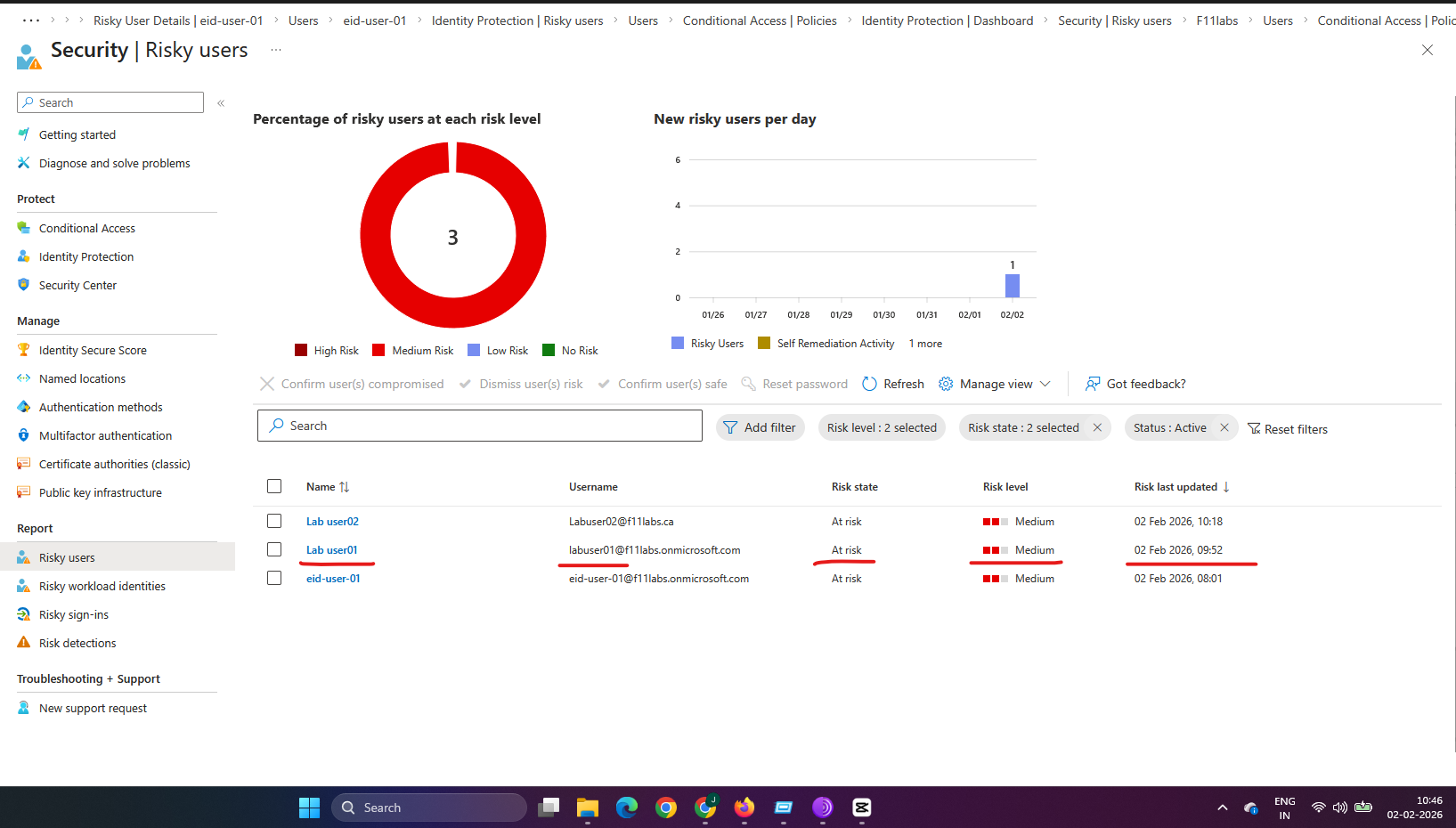
EID-EXP-004-03 – User Risk Alert Persists Without Remediation
Control Area: Identity Protection – Risky Users Report
Observation: After one or more risky sign-ins, the user account is marked as At risk in the Identity Protection Risky Users report.
Expected Secure State: The user should be required to remediate risk, such as resetting their password, automatically or be blocked.
Actual Result:
- Identity Protection shows the user risk status as At risk.
- Automated remediation does not occur by default.
- Administrators must intervene manually or enable appropriate policies.
- Access remains unchanged until action is taken.
Impact:
- High-risk accounts remain usable without enforced remediation.
- Administrative alerts are often ignored unless they are escalated.
- This creates a false sense of security because alerts exist but do not secure the tenant.
Evidence Artifact: Risky Users list showing a test user in the “At-risk” state without controls in place.
EID-EXP-004-04 – Alerts Are Ignored Without Conditional Access Policies
Control Area: Identity Protection – Enforcement
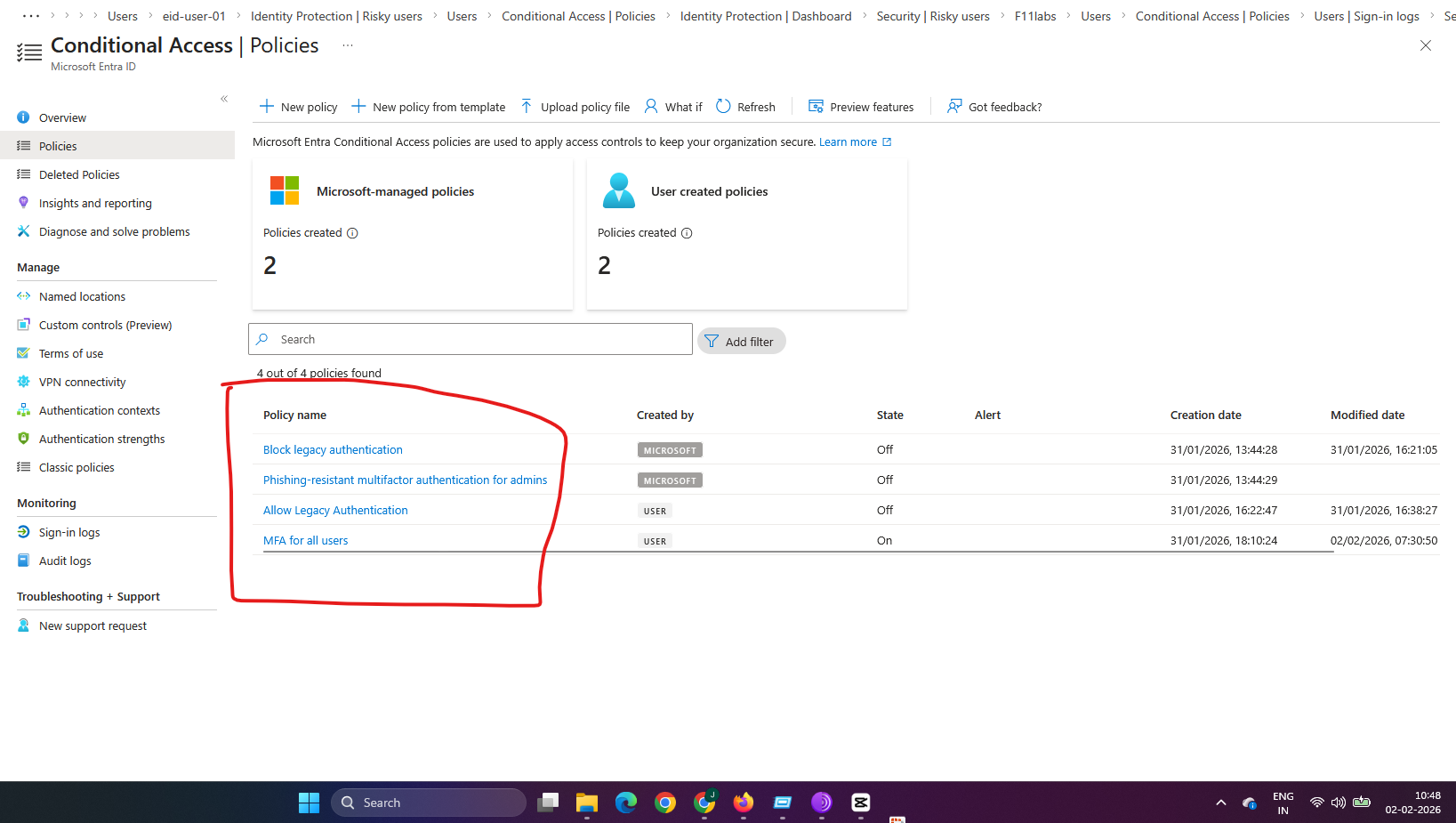
Observation: Although Identity Protection detects risk events, no access controls are enforced because risk-based Conditional Access policies were not configured.
Expected Secure State: Alerts should trigger Conditional Access controls (e.g., MFA challenge, password reset) automatically.
Actual Result:
- Alerts are visible in the portal but have no effect on access.
- The test user can continue normal access from any location.
- Administrators may overlook alerts if there are no triggers enforcing remediation.
Impact:
- Alerts become informational and are often disregarded.
- Attackers can exploit this gap by triggering and bypassing risk signals.
- Accounts are not protected unless risk policies are enabled.
Evidence Artifact: The Conditional Access section shows no active risk-based policies, even though Identity Protection alerts exist.
Evidence Summary
| 004-01 | Tenant Validation | Informational |
| 004-02 | Risky Sign-In | High – Alerts without blocking |
| 004-03 | Risky Users | High – Alerts persist without remediation |
004-04 | Enforcement Controls | Critical – No controls enforce alert outcomes |
Evidence-Based Conclusion
This experiment confirms that default Identity Protection alerts generated by Microsoft Entra ID are informational unless risk-based Conditional Access policies are deployed. Alerts such as risky sign-ins and risky users are logged, but access is not restricted, which allows suspicious sessions to continue. Without automated enforcement, such as requiring a password reset or blocking access for high user risk, administrators can easily ignore alerts. This can result in compromised identities remaining active and undetected.
Next Experiment EID-EXP-005 – Enforcing Risk Remediation with Conditional Access Policies
Related Analysis & Fix Guidance
- Technical deep dive: Why Detection Alone Does Not Prevent Compromise in Microsoft Entra ID
- MSP risk & business impact: Why Identity Protection Alerts Do Not Automatically Prevent Attacks
- Video walkthrough: Microsoft Entra Identity Protection Alerts Don’t Stop Attacks (Evidence Lab)